
Why are the meeting days wrong?
Meeting Schedule Assistant

Andrew Truckle
Last Update a year ago
Are the meeting days showing up incorrectly—Thursday for the midweek meeting and Sunday for the weekend meeting? This is the default configuration in Meeting Schedule Assistant. If your congregation meets on different days, here’s how to fix it.
🆕 New Installations
If you've just installed Meeting Schedule Assistant, follow these steps:
Add your congregation.
Set it as Local—even if you're not adding any speakers.
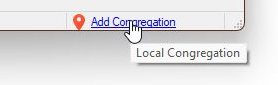
💡 You can quickly do this by clicking the Add Congregation hyperlink in the status bar:
🔄 Existing Installations
If you’ve already added your congregation but the days are still incorrect, it’s likely that the Local checkbox wasn’t selected.
✅ Make sure Local is checked and then click Apply Changes.

Once this is done, the meeting days should update to match your congregation's actual schedule.
Online Help